

Design is all about solving problems. At Putti, we follow a user-centric methodology that addresses challenges for both our clients and their customers. Our UX designers and UI specialists collaborate to create solutions that work intuitively and resonate across audiences, from the first interaction to the final screen.
Why Good UX and UI Design Both Matter
User experience (UX) design ensures people have positive, friction-free interactions with a product or service. User interface (UI) design addresses the visual presentation: typography, colour, layout, and hierarchy. A complete design approach integrates both to create products that function intuitively and appeal aesthetically.
Many organisations prioritise visual polish over functionality, producing attractive but difficult-to-use products that frustrate users and drive abandonment. In competitive markets, superior user experience is a genuine differentiator: satisfied users become advocates who recommend your product to others.
What Does a UX/UI Process Actually Look Like?
Putti uses a five-step methodology that moves from problem identification through to quality delivery. Each phase builds on the last, ensuring no shortcuts are taken before the next begins.
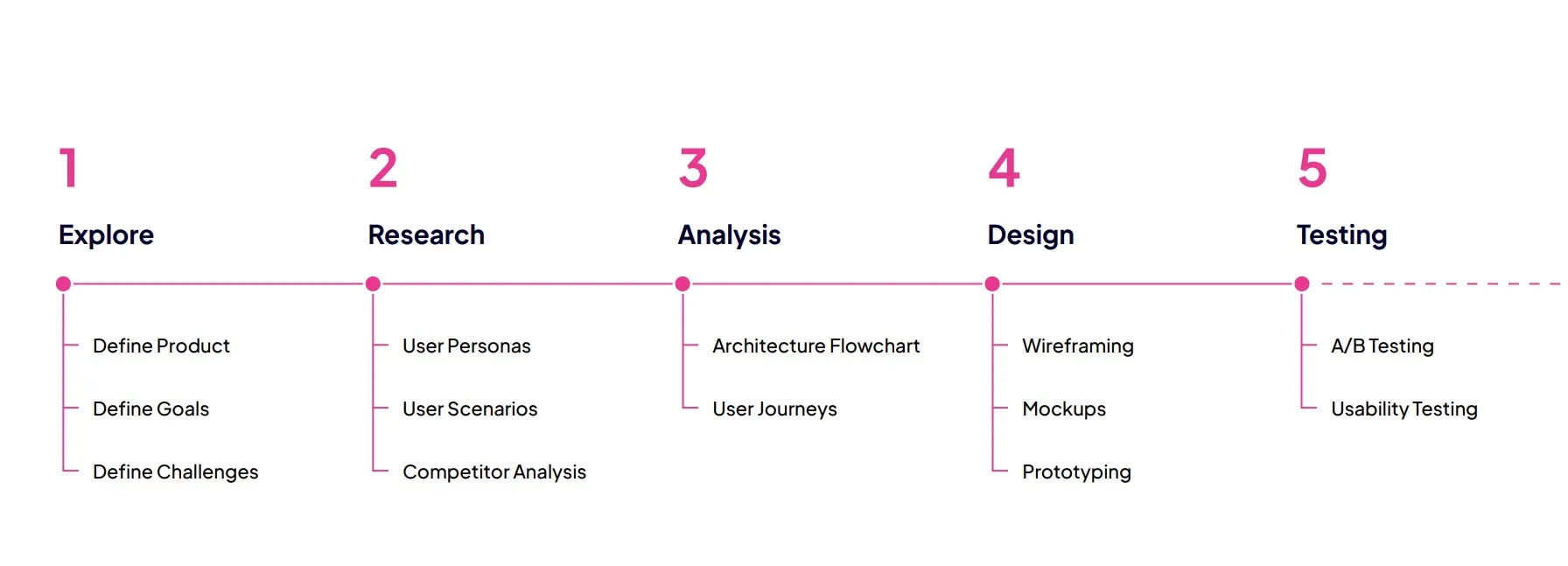
Step 1, Explore: Define the Problem and Goal
Successful products start with a comprehensive understanding of context and user challenges. This initial phase examines what the product needs to solve and identifies stakeholder needs. We establish measurable objectives, both qualitative (user satisfaction) and quantitative (conversion rates), to define what success looks like.
Step 2, Research: Gather Insights and Analyse Competitors
UX research combines multiple methodologies: user interviews, focus groups, ethnographic studies, surveys, and card sorting. Each technique builds a fuller picture of how people interact with a product and what they expect from it. Competitive analysis reveals market positioning and surfaces design trends worth considering.
Step 3, Analyse: Sitemaps and Information Architecture
Data from research is synthesised into insights that guide ideation. Sitemaps improve information architecture by organising related content and establishing logical placement, preventing the user confusion that comes from poor navigation design.
Building User Flows
User flows map the screens and interaction patterns users encounter end-to-end. They serve as a shared reference between designers and developers during implementation, reducing ambiguity and misaligned expectations.
Step 4, Design: Wireframes, Mockups, and Prototypes
Wireframing
Low-fidelity wireframes function as architectural blueprints, displaying fundamental features and content structure without visual refinement. They ensure alignment on user needs before any development work begins.
Mockups and Prototyping
Post-wireframe prototypes demonstrate how interface components integrate with one another, giving stakeholders something tangible to evaluate before development starts. This prevents confusion about feature placement and interaction behaviour.
Step 5, Test: Usability Testing with Real Users
Testing designs with actual users before development identifies problems early, preventing costly fixes after launch. Face-to-face usability sessions gather real-time feedback on both functionality and areas that need refinement.
A Process Built on More Than a Decade of Experience
Our five-step process might seem lengthy, but our experience across industries and platforms proves it works. By investing time upfront to understand users and objectives, we deliver high-quality products that succeed in the real world, not just in the design file.
To learn more about how we approach UX and UI, visit our UX design services.